Free Printable Cricut Cheat Sheets for Beginners – Looking for free printable Cricut cheat sheets? These quick-reference guides help USA crafters master Cricut Design Space, materials, blades, and common techniques without constant online searching. Whether you own a Cricut Maker, Explore, Joy, or newer model, printable cheat sheets keep essential info at your craft table.
This resource page explains what free printable Cricut cheat sheets cover, why they matter for beginners and experienced users, and where to download legitimate free versions from trusted sources.
What Are Free Printable Cricut Cheat Sheets?
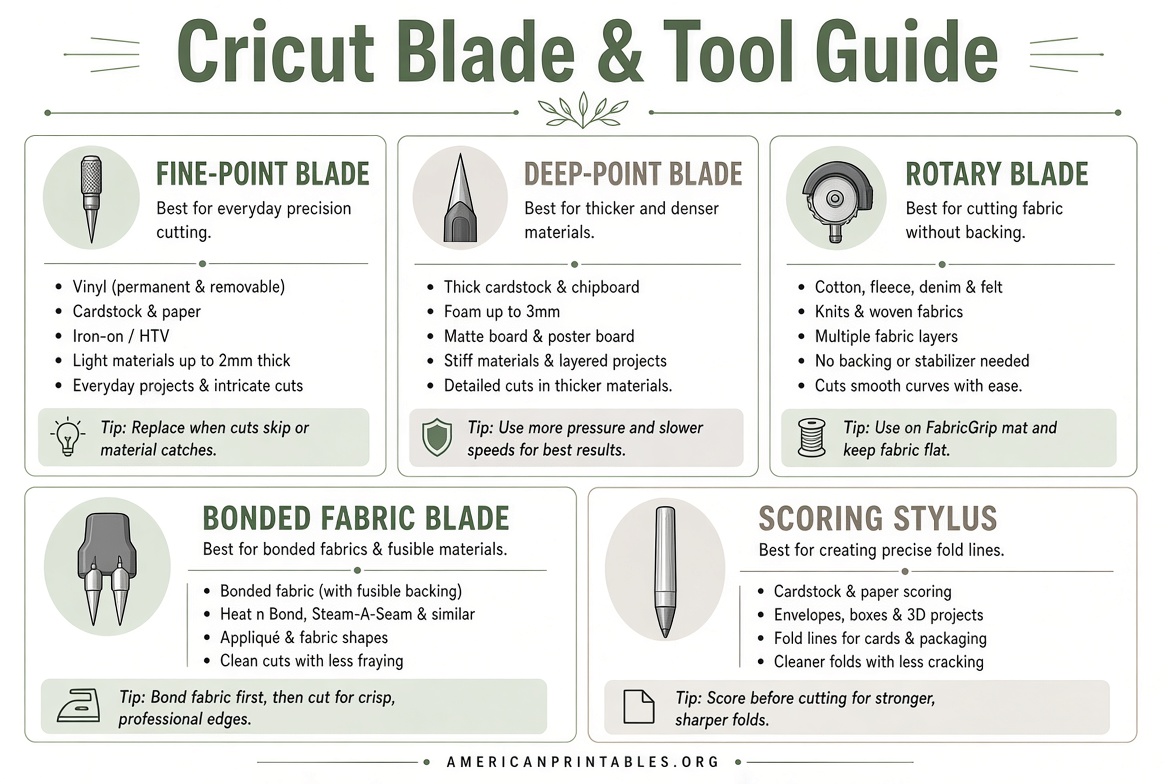
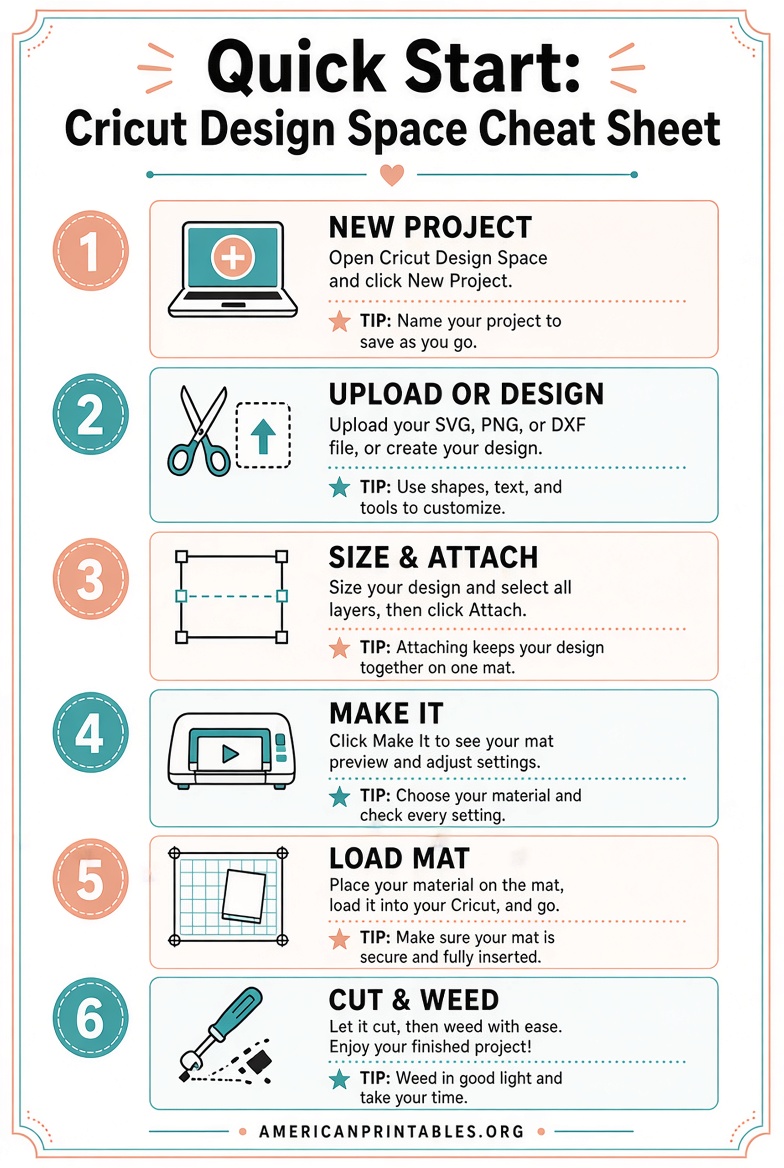
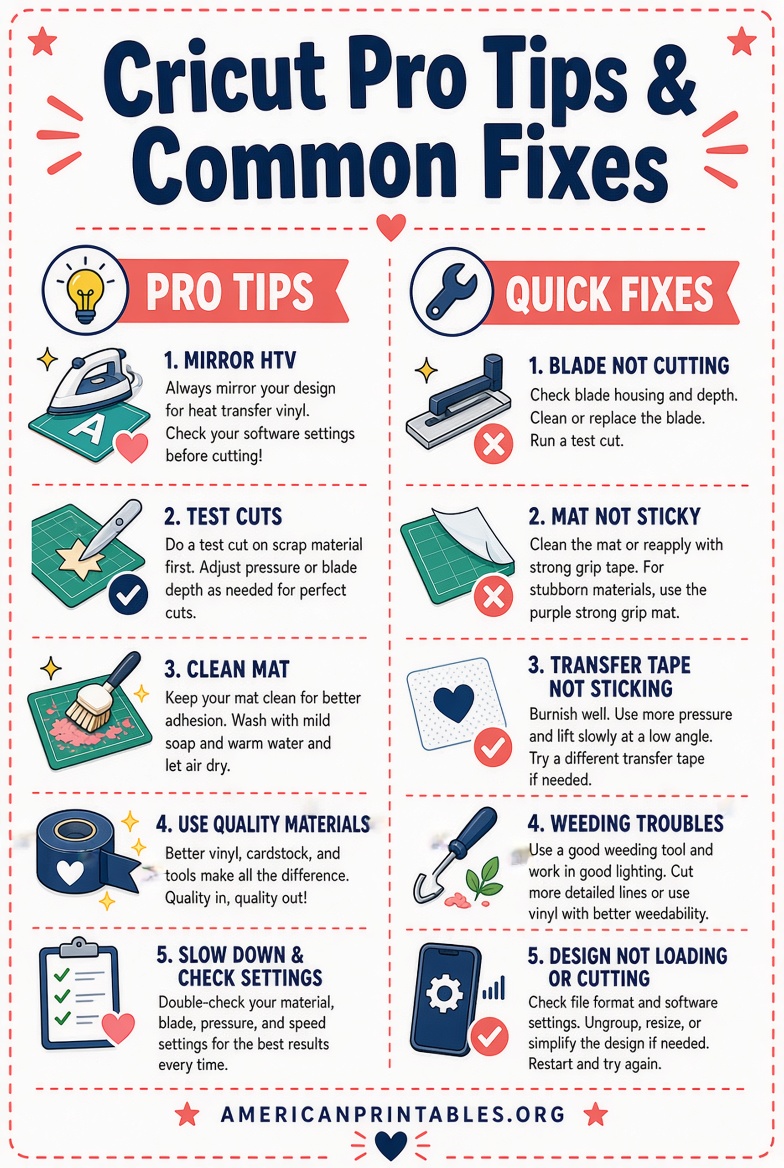
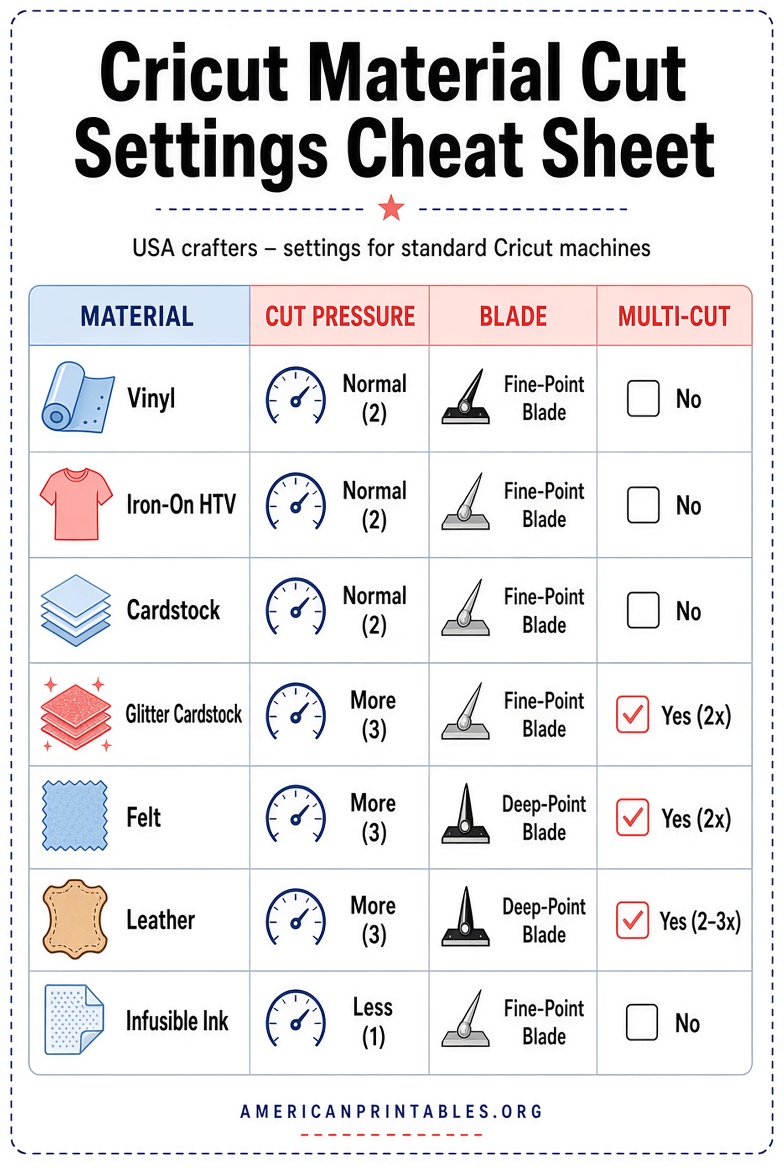
Cricut cheat sheets are one-page (or short multi-page) PDF guides you can print and keep near your machine. They summarize key Design Space tools, material settings, blade choices, fold-line options, Print Then Cut tips, and troubleshooting steps.
They are especially useful for:
- Remembering when to use Group, Attach, Weld, Slice, or Flatten
- Choosing the right mat, blade, and cut settings for vinyl, cardstock, iron-on, or Infusible Ink
- Checking Print Then Cut readiness
- Handling intricate cuts cleanly
- Keyboard shortcuts and Layers Panel tools
Because Cricut machines and Design Space update over time, the best free printable Cricut cheat sheets focus on evergreen concepts that apply across current models popular in the United States.
Why Free Printable Cricut Cheat Sheets Help USA Crafters?
New Cricut owners often feel overwhelmed by Design Space buttons, material dials or custom settings, and the sheer number of project types (vinyl decals, HTV shirts, paper crafts, stickers). Experienced users still benefit from a quick visual reminder when switching materials or tackling detailed cuts.
Printed sheets stay offline, so you can reference them while your machine is cutting or when your phone or computer is busy. Many USA crafters laminate them or keep them in a clear sleeve next to the machine for durability.
Trusted Places to Get Free Printable Cricut Cheat Sheets
Here are legitimate, currently available free resources. All require only an email signup or a simple download—no payment. Always download from the original creator’s site.
Jennifer Maker – Free Cricut Confidence Kit
This popular free digital download includes five printable Cricut cheat sheets covering machine/tool/material basics, fold-line options (pen vs. score vs. dashed cut), Print Then Cut readiness, intricate-cut troubleshooting, and Layers Panel tools. Enter your email on the page or find Design #809 in her free library if already subscribed.
Download the free Cricut Confidence Kit here.
Shawn Mosch – Free Cricut Design Space Cheat Sheet
A straightforward one-page (or short PDF) guide that labels the main Design Space buttons and functions. Ideal for absolute beginners learning the interface. Click the download button on the page for the free PDF.
Get the free Design Space cheat sheet.
Practically Functional – Free Design Space Cheat Sheets
These printable guides walk through adding text/images/shapes, working with layers, project preview, material settings, and loading blades/tools/mats. Completely free via email signup.
Request the free Design Space cheat sheets.
Official Cricut Help Resources
Cricut includes printable cheatsheets and keyboard-shortcut guides inside Design Space itself (Help menu → Cheatsheets). For material-specific instructions, visit the official Help Center (search “Printable Vinyl,” “materials,” or similar). These are the most authoritative sources for current machine settings.
Visit Cricut Help Center.
Jennifer Maker also offers additional free printable references, such as a detailed Cricut terms glossary and keyboard-shortcuts sheet, available through her site and free resource library.
Limit yourself to these trusted sources. Avoid random file-sharing sites that may host outdated, incomplete, or unauthorized PDFs.
Free Printable Cricut Cheat Sheets for Beginners
How to Use Your Free Printable Cricut Cheat Sheets?
- Download the PDF and print on regular letter-size paper (or cardstock for durability).
- Laminate or place in a sheet protector if you want it to last through many projects.
- Keep the most-used sheets (Design Space tools and material basics) right by your machine.
- Cross-check any material-specific settings with the current recommendations inside Design Space or the official Cricut Help Center, because pressure and multi-cut values can change with software updates.
- Pair the sheets with real practice projects—start simple (basic vinyl decal or cardstock shape) and add complexity as needed.
Quick Tips for Getting the Most from Cricut Cheat Sheets
- Focus first on the tools and materials for the project you want to make today rather than trying to memorize everything.
- Update your free downloads occasionally; creators sometimes refresh them for new Design Space features.
- Combine a general Design Space sheet with a materials sheet for faster workflow.
- For heat-transfer or Infusible Ink projects popular in the USA, note temperature/time charts when available, but always test on scrap material.
Brief FAQ About Free Printable Cricut Cheat Sheets
Are these really free?
Yes. The linked resources from Jennifer Maker, Shawn Mosch, and Practically Functional are free digital downloads (email signup is common and standard for craft creators).
Do they work with all Cricut machines?
Most cover general Design Space concepts and common tools that apply across Maker, Explore, Joy, and newer models. Always confirm specific blade or feature compatibility for your exact machine in Design Space or the official Help Center.
Can I share the printables?
Respect the creator’s terms. Personal use is fine; redistribution of the PDFs is usually not allowed.
What if Design Space has changed?
Official cheatsheets inside the app and the Help Center stay current. Community free printables focus on stable concepts that rarely change.
Free printable Cricut cheat sheets turn confusion into confidence. Download a couple of the trusted options above, print them, and keep them handy. You’ll spend less time searching and more time creating vinyl decals, custom apparel, paper crafts, and the many other projects USA Cricut owners love. Happy crafting!