Free Printable Router Bit Profile Chart PDF Guide – A PDF printable router bit profile chart is one of the most useful pages you can hang in a U.S. woodshop. It shows the shape each bit leaves in the wood, so you can identify bits in a drawer, match a molding, or pick the right cutter before you turn on the router.
This page explains what the chart is, how to use it, and where to download legitimate free printables—including a public-domain profile diagram and official manufacturer catalogs that show wood profiles at actual size.
What a Router Bit Profile Chart Shows?
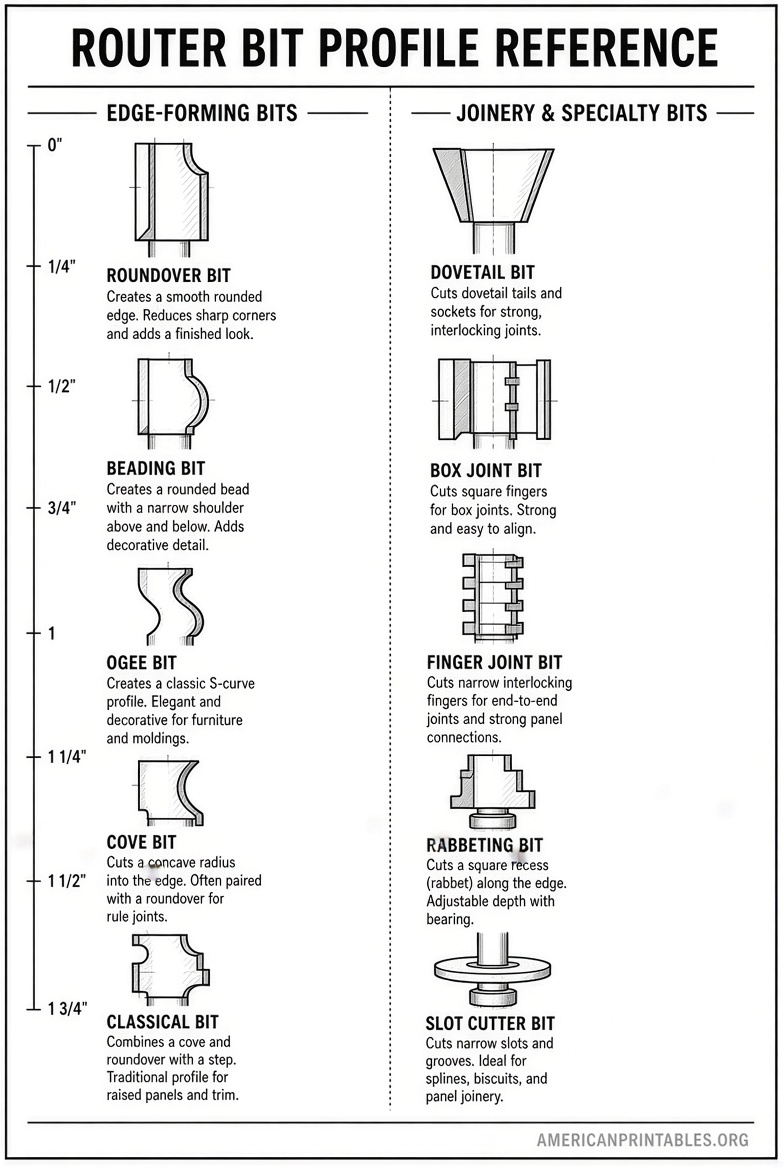
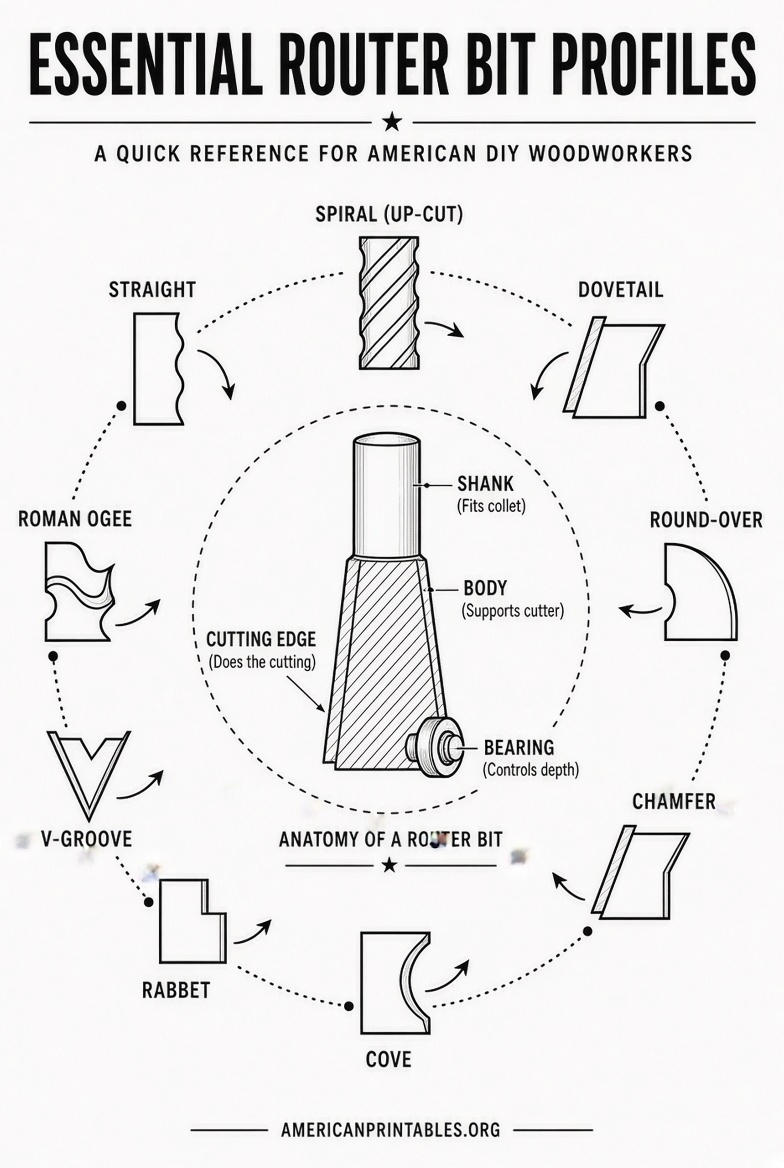
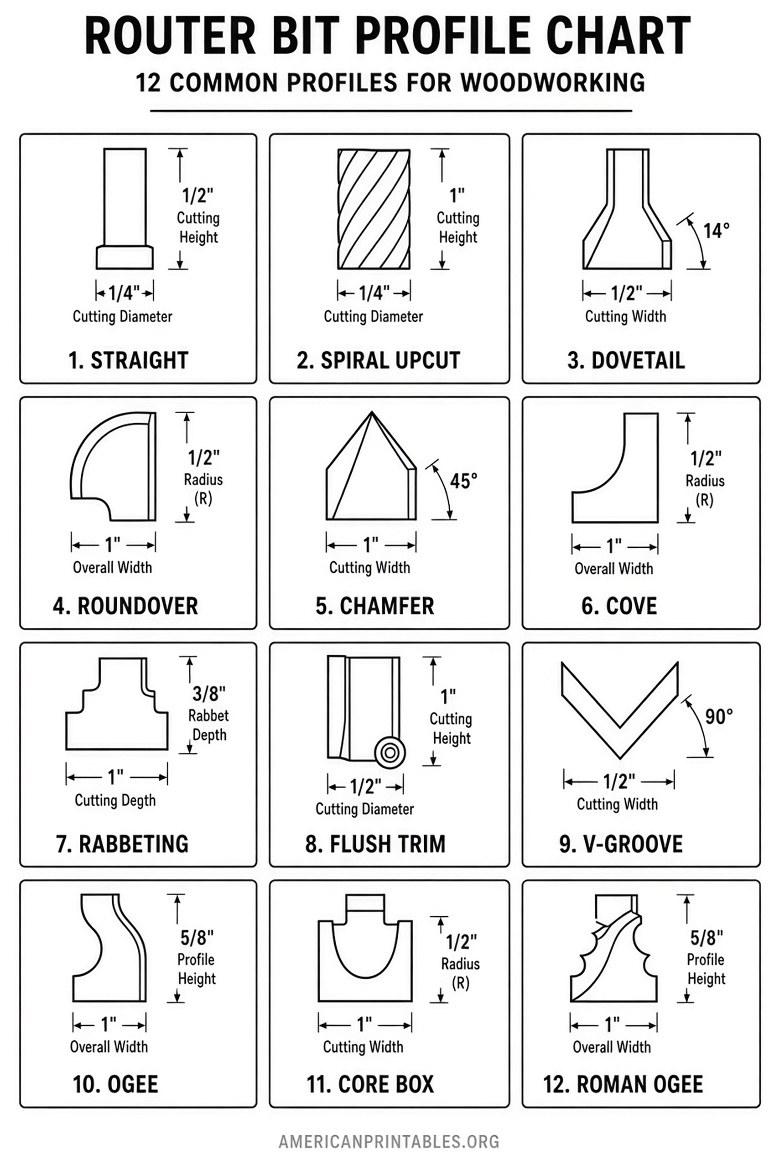
A router bit profile is the outline left in the workpiece after the cut. The chart is a visual key: name of the bit on one side, shape of the cut on the other.
Most shop charts cover these groups:
- Edge-forming bits: roundover, cove, chamfer, Roman ogee, beading
- Grooving bits: straight, V-groove, core box (round nose), rabbeting
- Joinery bits: dovetail, lock miter, tongue and groove, drawer lock
- Template bits: flush trim and pattern bits with a bearing
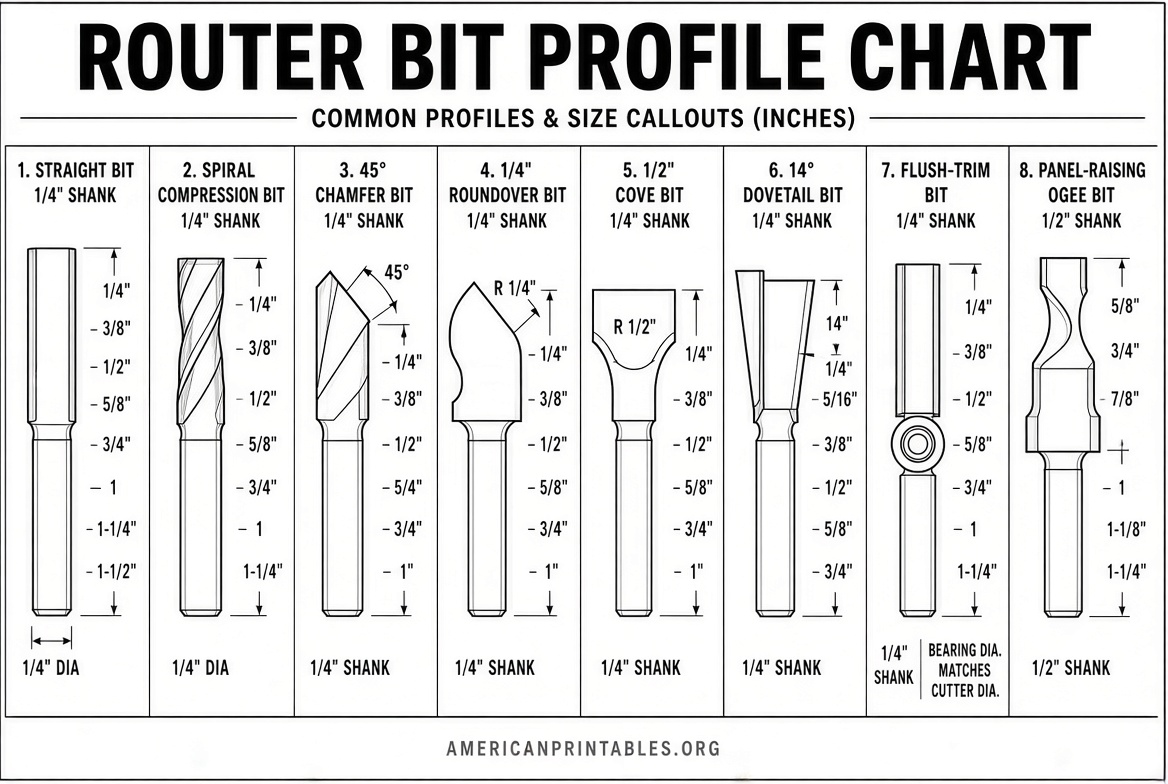
U.S. catalogs list sizes in inches. Radius is the number that matters on a roundover or cove (a 1/4″ roundover leaves a quarter-circle with a 1/4″ radius). Shank size is usually 1/4″ or 1/2″.
Why Print a Chart Instead of Searching Photos?
Photos on a phone are hard to compare at the bench. A printed router bit profile chart PDF lets you:
- Hold a sample molding against a 1:1 drawing
- Label bits in a storage tray
- Check whether a Roman ogee or an ogee fillet matches an existing door
- Teach a helper the difference between a cove and a core box
Print at 100% scale. Do not “fit to page” if you want actual-size profiles.
Free Printable Router Bit Profile Chart Downloads
These are real, current resources. None of the links below is a made-up file, and catalogs are official manufacturer or authorized-dealer downloads.
1. Simple labeled chart (best wall reference)
Wikimedia Commons hosts a free English-labeled diagram of common cuts: chamfer, V-groove, cove, round nose, rabbeting, dado, roundover, dovetail, Roman ogee, and beading.
Download the labeled SVG or print the page from
Wikimedia Commons: Router bit profiles (English).
It is licensed for reuse. Print it large, then write your own bit part numbers next to each shape.
2. Whiteside catalog (U.S. maker, actual-size profiles)
Whiteside Machine Company is based in North Carolina and publishes a free full catalog. Many pages show edge profiles at actual size—the format most shops want when they search for a printable router bit profile chart.
Download the current catalog PDF from
Whiteside Machine official catalog (PDF).
Print the roundover, cove, ogee, and raised-panel pages at 100%.
3. Amana Tool router-bit catalog (dimensioned drawings)
Amana catalogs mark wood profiles at actual size and include tool numbers, shank sizes, and replacement bearings. An authorized dealer hosts the router-bit section as a free PDF.
Download it from
Amana Tool router bits catalog (PDF).
Use this when you need measurements, not just a silhouette.
4. Freud official catalog downloads
Freud publishes free routing-tool catalogs and a general product catalog. The routing booklet covers handheld, table, and CNC bits sold widely in the United States.
Get the current files from
Freud Tools official Downloads page.
Look for “Routing tools for portable machines” and the general product catalogue.
5. Specs and speed chart for the same bits
A profile chart tells you the shape. You still need safe speed. WoodWeb’s Router Bits 101 page includes a dimension diagram (diameter, radius, shank) and suggested maximum RPM by cutting diameter.
Read it here:
WoodWeb: Router Bits 101.
Typical shop guidance: bits up to 1″ diameter often run near 24,000 RPM; larger cutters must run slower. Never exceed the max RPM stamped on the bit.
Free Printable Router Bit Profile Chart PDF Guide
How to Read the Chart at the Bench?
Match three things, in this order:
- Shape of the cut — convex (roundover), concave (cove), S-curve (ogee), bevel (chamfer).
- Radius or angle — 1/8″, 1/4″, 3/8″, 1/2″ are common U.S. radii; chamfers are often 45°.
- Shank and bearing — a 1/2″ shank is stiffer in a table router; a bearing lets you follow an edge without a fence.
A roundover and a beading bit can look similar. The bead has a small step (fillet) above the curve. Many bits convert from roundover to bead by swapping a smaller bearing.
Common Profiles and Typical U.S. Shop Uses
Straight / spiral. Dados, grooves, mortises. Use a down-cut or compression bit on veneered plywood if the top face must stay clean.
Roundover. Softens tabletops, shelves, and chair parts. A 1/8″ or 1/16″ bit is a good “eased edge” on cabinet doors.
Cove. Decorative hollows and drop-leaf rule joints when paired with a matching roundover.
Chamfer. 45° shadow lines on frames and plywood shelves.
Roman ogee. Classic furniture and picture-frame edges.
Core box / round nose. Flutes, finger pulls, and lettering grooves.
Rabbeting. Recesses for cabinet backs, glass, and shiplap. Depth often changes with bearing size.
Dovetail. Drawer joints and sliding dovetails. Angle is commonly 7° to 14°.
Flush trim / pattern. Copies a template. Bottom bearing for handheld work with the pattern on top; top bearing for table routing with the pattern underneath.
How to Print a Shop-Ready PDF Chart?
- Set the printer to Actual size or 100%. Turn off “Fit to page.”
- Use letter paper for a wall chart; use tabloid (11″ × 17″) if you are printing catalog pages with 1:1 moldings.
- Print only the pages you use: edge-forming, joinery, and door bits.
- Slip the sheets into a plastic sleeve or pin them above the router table.
- Write your inventory next to each profile: brand, part number, shank, and radius.
If a catalog page says “wood profiles shown at actual size,” that page is your printable profile chart for those bits.
Quick Safety Notes for U.S. Shops
- Wear eye and hearing protection.
- Insert the shank fully into the collet, then back it out about 1/16″ so it does not bottom out.
- Take deep profiles in several passes.
- Large-diameter bits (panel raisers, big roundovers) belong in a router table at reduced RPM.
- Replace a bit that burns, chips, or vibrates. A dull profile chart still looks fine; a dull bit does not cut fine.
FAQ
Is there one official one-page “router bit profile chart PDF”?
No single industry standard sheet exists. Shops use a simple labeled diagram plus manufacturer catalog pages that show profiles at 1:1 scale.
Are manufacturer catalogs free to print?
The official download pages listed above offer free PDFs. Print them for personal shop reference. Do not republish a catalog as your own product.
Will a metric catalog work in a U.S. shop?
You can identify the shape, but sizes will be in millimeters. Prefer inch catalogs from Whiteside, Amana, or Freud if you buy bits by 1/4″ and 1/2″ shank.
Can I identify an unmarked bit with a chart?
Yes. Make a light test cut on scrap, then compare the cut to a 1:1 profile drawing. Measure radius with a radius gauge if you have one.
What related searches does this chart cover?
Router bit identification chart, router bit shapes chart, printable router bit guide, and router bit profile drawings.
Keep the Commons diagram on the wall for names and shapes. Keep one manufacturer catalog PDF on your phone or printed at 100% for actual-size profiles and part numbers. That combination is the practical PDF printable router bit profile chart most U.S. woodworkers need.